Here’s a question that keeps a lot of small business owners up at night, especially after they stumble on a news story about a restaurant owner getting sued over their website, of all things: “Does my small business website have to be ADA compliant? I only have 8 employees and a basic Shopify store.”
The short answer is: quite possibly, yes, and this surprises most people who associate the ADA with wheelchair ramps and accessible restrooms, not web pages.
The longer answer — and the one that will actually protect your business — is what this guide is for. By the time you finish reading, you’ll know:
• What ADA web compliance actually means
• Which businesses are legally required to comply
• The real cost of ignoring it, including lawsuit stats from 2024–2025
• What to do if you’ve already received a demand letter
• How to make your website compliant without rebuilding it from scratch
This is the most thorough, honest guide on small business ADA web compliance you’ll find, written to give you clarity and a clear path forward. Let’s get into it.
What Is ADA Web Compliance?
The Americans with Disabilities Act (ADA) was signed into law in 1990 by President George H.W. Bush. Its original purpose was to end discrimination against people with disabilities in everyday life — at work, in public spaces, and when accessing services. Think ramps at building entrances, braille on elevator buttons, and accessible restrooms.
What nobody anticipated in 1990 was the internet. As the web became the primary way people shop, book appointments, order food, and access services, courts began applying ADA principles to websites. The logic is straightforward: if a business must be physically accessible, its digital front door should be too.
Who Counts as a Person with a Disability?
More people than you might think. According to the US Centers for Disease Control and Prevention (CDC), 1 in 4 adults in the United States lives with some form of disability. These include visual, auditory, motor, and cognitive differences — many of which affect how people interact with websites.
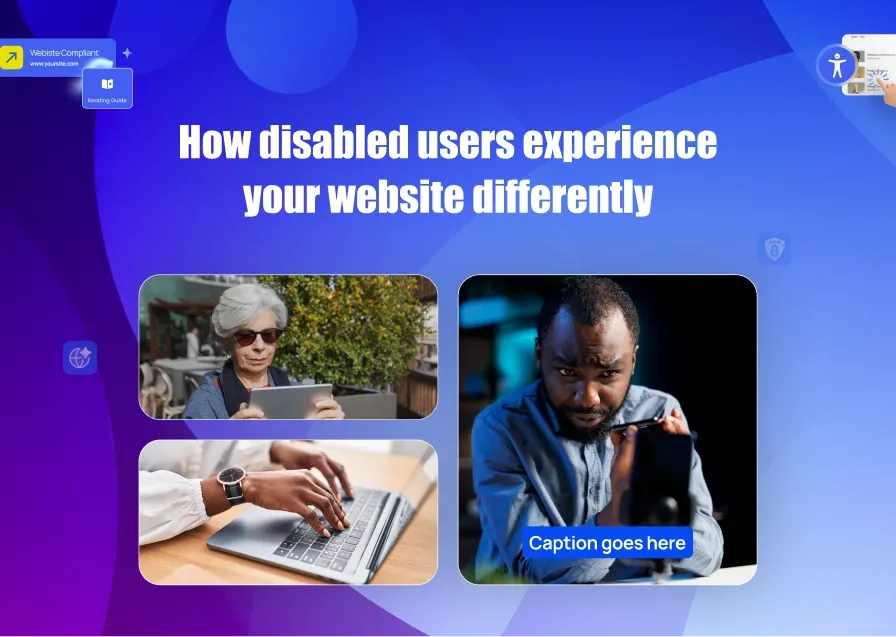
• Visual impairments: Blind people rely on screen readers to convert page text to audio. If you have missing image alt text on your site, that means complete information blackout for blind users.
• Motor disabilities: Many users navigate sites with a keyboard only. If your site requires a mouse for easier navigation, these users are locked out entirely.
• Hearing impairments: When you upload videos without captions on your site, you automatically exclude deaf users from your content.
• Cognitive differences: Flashing animations or overly complex layouts can be unusable or dangerous for users with epilepsy or cognitive disabilities.
The Three Frameworks You Need to Know as a Small Business Owner
The ADA (Americans with Disabilities Act): This is a federal law. ADA Title III applies to “places of public accommodation” which courts have increasingly ruled includes websites.
WCAG (Web Content Accessibility Guidelines): This is not a law. It is a technical guideline. The ADA is the law. Created by the World Wide Web Consortium (W3C), WCAG 2.1 Level AA is the de facto standard courts and regulators point to when determining if a website is “accessible.” Think of it as the building code for the web.
Section 508: This applies specifically to federal government agencies and organizations that receive federal funding (schools, universities, healthcare providers). If you’re in this space, Section 508 compliance is mandatory.
Does Every Small Business Website Have to Be ADA Compliant?
This is where the most dangerous myth lives. Many small business owners believe the ADA’s 15-employee threshold protects them. It does not, at least not for your website.
Here’s the breakdown:
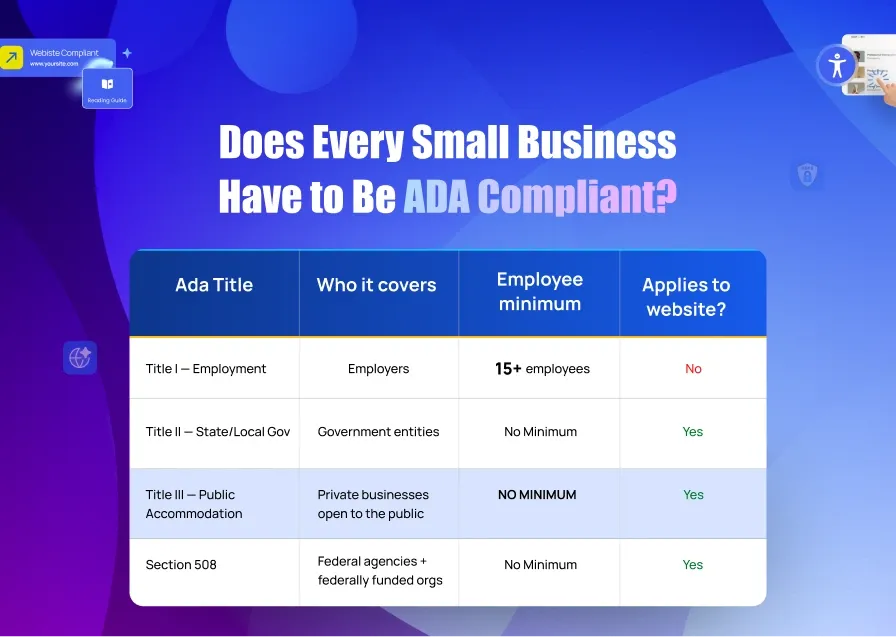
The 15-employee rule applies only to Title I (employment discrimination) — not Title III. Title III has no employee threshold whatsoever. If you operate a business that serves the public, you are a “place of public accommodation,” and Title III applies to you.
What Counts as a “Public Accommodation”?
The ADA defines 12 categories of public accommodations. If your business falls into any of these, you are covered:
• Retail stores and e-commerce shops
• Restaurants, cafés, and food delivery services
• Hotels, bed and breakfasts, and vacation rental management companies
• Professional service providers (lawyers, accountants, healthcare offices)
• Entertainment venues and event businesses
• Gyms, spas, and personal care services
• Schools and private educational services
In 2024, a lawsuit was filed against Sweetgreen — a fast-casual restaurant chain — alleging blind users couldn’t access its website. The suit noted it wasn’t Sweetgreen’s first rodeo; they had settled a similar case in 2016. The law applies regardless of size, and courts are not sympathetic to “we didn’t know.”
Is Your Small Business Website ADA Compliant?
Click here to check for ADA violations on your website for free. You get a full, detailed report afterwards.
OR
Answer YES to even one of these questions and you are almost certainly required by law to make your website accessible under ADA Title III and/or WCAG 2.1 AA standards.
☐ Question 1: Does business website sell products or services — online or in person — to members of the general public?
This is the foundational trigger for ADA Title III. The law applies to any private business classified as a “place of public accommodation” — which includes retail stores, restaurants, service providers, healthcare offices, hotels, gyms, schools, and e-commerce shops. There is no employee minimum and no revenue threshold for this requirement. If you serve the public in any capacity, your small business website has to be ADA compliant as it falls under Title III.
☐ Question 2: Does your website contain images, photos, graphics, icons, or buttons?
This directly tests one of the most cited WCAG 2.1 AA requirements. Every meaningful image on your website must have descriptive alternative text (alt text) so screen reader users can understand what it conveys.
Missing alt text is cited in 89% of all ADA website complaints and is the single most litigated technical violation. If your site has any images and they don’t all have alt text, you are out of compliance.
☐ Question 3: Does your website have any forms, input fields, contact pages, checkout processes, or sign-up fields?
Forms are one of the most common and legally dangerous accessibility failure points, directly tested under WCAG 2.1 AA Success Criteria. Every form field must have a visible, programmatically associated label. Error messages must be descriptive. Forms must be fully operable by keyboard alone, no mouse required.
A contact form, newsletter signup, or checkout page that a screen reader user or keyboard-only user cannot complete is a documented barrier and a lawsuit trigger.
☐ Question 4: Does your website have any videos, audio clips, or multimedia content?
This tests WCAG 2.1 AA Success Criteria 1.2.2 (Captions) and 1.2.3 (Audio Description). All pre-recorded video content must have accurate closed captions for users who are deaf or hard of hearing. All audio-only content (like podcasts or audio announcements) must have a text transcript. This applies to product demo videos, testimonials, how-to content, background music with meaningful audio — anything that conveys information through sound.
Netflix was sued and lost specifically over missing captions. If you have a single uncaptioned video on your site, you have a documented violation.
☐ Question 5: Does your business operate in, accept customers from, or target any US state — or receive any federal funding, grants, or government contracts?
This question catches two important categories. Firstly, all 50 US states recognize ADA Title III for websites — but states like California (Unruh Civil Rights Act) and New York (Human Rights Law) have their own additional accessibility laws that are even stricter, with per-violation statutory damages. You do not need a physical location in those states to be targeted; serving customers there is enough.
Secondly, if your business receives any federal funding — including SBA grants, federal contracts, Medicare/Medicaid reimbursements, or Title IV student aid — you are also subject to Section 508 of the Rehabilitation Act, which mandates full WCAG 2.1 AA compliance with no exceptions.
What Your Answers Mean
| Your Answer | What It Means |
|---|---|
| YES to any 1 question | You are very likely legally required to meet WCAG 2.1 AA standards under ADA Title III |
| YES to questions 1 + 2 or 3 | You have the two most commonly sued violations — immediate action recommended |
| YES to question 5 (federal funding) | Section 508 applies to you in addition to ADA Title III — stricter timeline requirements |
| YES to all 5 | Your site has multiple active legal exposure points — a compliance audit is urgent |
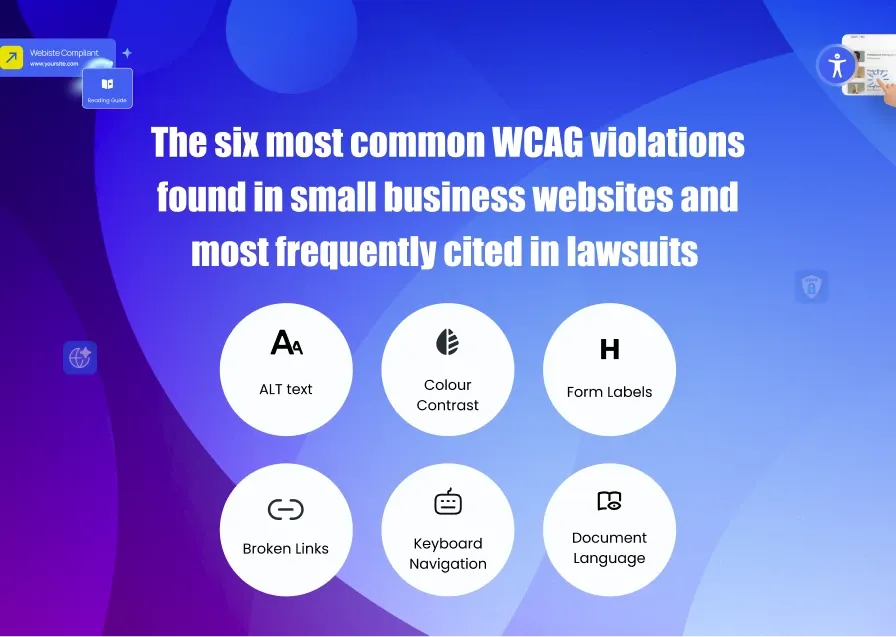
1. Missing alt text on images — cited in 89% of ADA website complaints
2. Insufficient color contrast — affects 79% of websites scanned
3. Missing form labels — affects 48% of websites
4. Empty or broken links — “click here” with no descriptive context
5. Keyboard navigation failures — content unreachable without a mouse
6. Missing document language declaration — prevents screen readers from functioning correctly
What Happens If Your Website Isn’t ADA Compliant?
Let’s talk numbers, because the data from 2024 and 2025 tells a story that should get every small business owner’s attention.
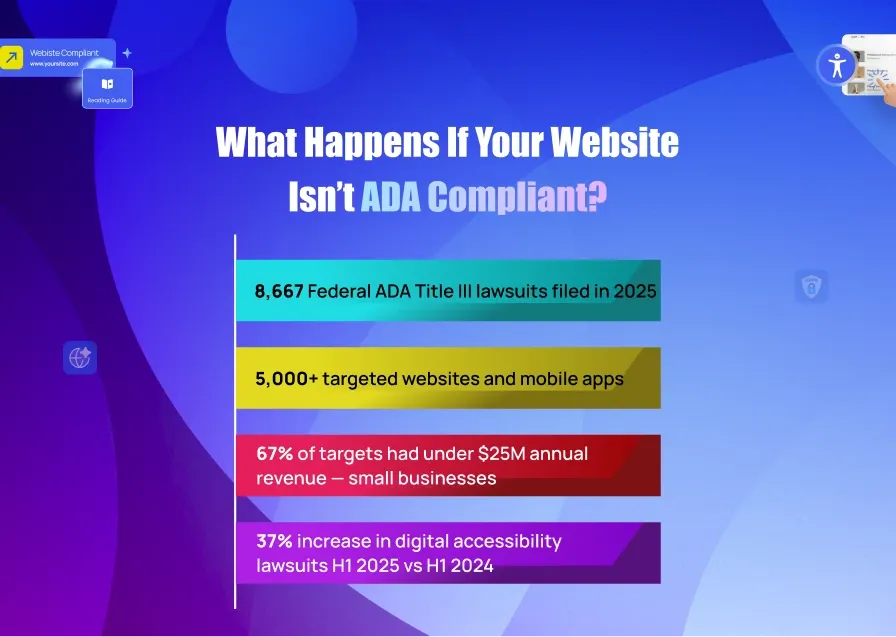
Beyond federal filings, an estimated 35,000–50,000 demand letters were sent to businesses in 2025 alone. These are the letters that arrive in your inbox or mailbox before a lawsuit is filed — often demanding immediate payment and compliance. Most businesses settle quickly because defending a lawsuit costs even more.
How Much Does an ADA Website Lawsuit Actually Cost?
The numbers vary dramatically depending on how far things escalate:
✔A demand letter settlement averages around $5,000
✔Businesses settling out of court typically pay $30,000
✔When a judge issues a ruling, the average judgment reaches $85,000
✔Class action suits can push costs to $400,000 or more
✔Hiring legal defense alone runs $30,000–$175,000 on top of any settlement
All told, the total cost of a typical case lands between $45,000 and $75,000
For context: Fashion Nova settled a web accessibility class action in 2025 for $5.15 million — the largest web accessibility settlement in recent history. Target paid $6 million after a 2006 case. Netflix paid $755,000 in legal fees after losing a case about missing closed captions. While you’re wondering if your small business website must be ADA compliant, take note of the warning below!
Warning: Don’t Rely on an Overlay Widget
In 2024, 25% of all ADA website lawsuits specifically cited accessibility overlay widgets as barriers, not solutions. In January 2025, the FTC fined accessiBe $1 million for falsely claiming their widget guaranteed ADA compliance. Simply installing a widget is not a legal shield.

The financial hit of a lawsuit is painful, but it’s only part of the story. Some of the most damaging consequences of ADA non-compliance have nothing to do with legal fines.
1. Reputational Damage
ADA lawsuits are public record. When a business is named in a complaint, it shows up in Google searches. For a local bakery, a restaurant, or a boutique fitness studio, having “ADA lawsuit” attached to your brand name on the first page of Google results is a slow-burn crisis. A national retail chain can absorb the PR hit. Most small businesses cannot.
2. You can be sued again even after you fix it
This is the part almost no compliance resource talks about. After realizing the hard way that your business website is required to be ADA compliant, imagine settling a lawsuit or fixing the issues cited in a complaint only to discover that it does not give you immunity from future lawsuits. If new violations emerge or if a different plaintiff’s firm targets you, you can be sued again.
Approximately 18% of defendants who settled an ADA website lawsuit in 2024 were sued again in 2025 for new or recurring violations. One-time fixes without ongoing monitoring create a revolving door of legal exposure.
3. Lost Revenue from Inaccessible Experiences
The disability community represents $2.6 trillion in global disposable income, according to the World Economic Forum. Research shows that 71% of users with disabilities will immediately abandon a website they cannot use. If your site is inaccessible, you’re not just at legal risk; you’re actively turning away paying customers.
4. SEO Penalties
Another reason why making your business website ADA compliant is worth the stress is because of SEO. Google’s crawlers can’t “see” images without alt text. They can’t understand page structure without proper heading hierarchy. Many WCAG compliance requirements directly overlap with technical SEO best practices. An inaccessible website is often a poorly indexed website.
The Business Case for ADA Compliance (It’s Not Just About Avoiding Lawsuits)
Compliance isn’t only about defense. If your goal for making your small business website ADA compliant is simply to avoid lawsuits, you’re getting it wrong. You should treat accessibility as a strategic investment rather than a legal obligation consistently in order to outperform those that treat it as a checkbox.
• Better SEO Rankings: Alt text, semantic HTML, keyboard navigation, and page structure all improve search engine crawling and indexing.
• Higher Conversion Rates: Accessible sites are cleaner, faster, and easier to navigate for every user. Reduced friction means more completed purchases and form submissions.
• Access to 61 Million American Adults with Disabilities: That’s 26% of the US adult population. Without an accessible site, you’re locked out of this market.
• Tax Credit Eligibility: Qualifying small businesses can claim up to $5,000 per year in federal tax credits (IRS Disabled Access Credit, Form 8826) for accessibility improvements. Most business owners don’t know this exists.
• Brand Trust and Reputation: Consumers increasingly expect brands to reflect their values. Accessibility signals inclusivity, which builds brand loyalty.
• Reduced Legal Risk = Lower Insurance Costs: Some business liability insurers offer better premiums to companies with documented compliance programs.
If you’re reading this because a letter landed in your mailbox this morning, take a breath. Getting a demand letter is alarming, but it’s not the end of the world — as long as you respond correctly. Here’s exactly what to do.
Step 1: Don’t Ignore It
Ignoring a demand letter does not make it go away. You’ll still have a legal obligation to make your business website ADA compliant and delaying will only make it escalate to a lawsuit. You have a limited window (often 30–60 days) to respond before a formal complaint is filed. Mark the date.
Step 2: Don’t Panic-install an Overlay Widget in Hopes of Making Your Business Website ADA Compliant.
This is one of the most common mistakes. Courts do not consider last-minute overlay installation as good-faith remediation. In fact, 25% of 2024 lawsuits targeted sites that already had an overlay installed. It will not help your case and may hurt it.
Step 3: Engage an ADA-Literate Attorney Immediately
You need legal counsel who understands digital accessibility. General business attorneys often don’t. Look for firms that have handled ADA Title III cases specifically.
Step 4: Start a Documented Accessibility Audit
Commission or run a formal accessibility audit immediately. A documented audit in progress demonstrates good faith, even if remediation is not yet complete. This documentation can significantly affect settlement terms.
Step 5: Do Not Make Undocumented Changes to Your Site
Any changes you make should be logged with timestamps and before/after evidence. Undocumented changes can weaken your legal position by making it harder to prove what was fixed and when.
Step 6: Evaluate Settlement vs. Defense
For most small businesses, settling a demand letter ($5,000–$15,000) is significantly cheaper than mounting a legal defense ($30,000–$175,000 in attorney fees alone). Your attorney should help you evaluate which path makes sense.
Step 7: Fix the Root Issues, Not Just What the Letter Cites
Once you’ve addressed the immediate legal situation, fix your website comprehensively. A targeted fix creates the conditions for repeat targeting. Use a full compliance platform — not a widget — to address all WCAG failures.
How to Make Your Business Website ADA Compliant, and Keep it That Way
There are two ways to approach ADA compliance: the hard way (manual audits, developer sprints, ongoing remediation, and hoping nothing changes) and the smart way. For small business owners who need real protection without a $50,000 development budget, there’s ADAcertify.
Unlike pure overlay tools that slap a widget on your site and call it done, ADAcertify uses a hybrid remediation engine. It combines AI automation for what’s fast and scalable, with real developer and accessibility expert review for the nuanced issues that automated tools miss. It’s the difference between putting a bandage on a wound and actually healing it.
Key Features of ADAcertify That Makes Your Business Website ADA Compliant
AI-Powered Alt Text Generation: Automatically generates WCAG-compliant descriptive alt text for every image on your site. Never get cited for missing alt text again, and get an SEO boost at the same time.
Branded Accessibility Widget: 70+ inclusive features your visitors can customize — cursor enlargement, readable fonts, contrast modes, link highlighting. Styled to match your brand, not clash with it.
Continuous Automated Monitoring: Your site changes constantly. ADAcertify scans continuously and alerts you to new violations before a plaintiff’s law firm finds them first.
One-Click Compliance Reports: Generate WCAG and Section 508 compliance reports instantly. In a legal dispute, documented compliance evidence is one of your strongest assets.
Code-Level Remediation: Goes beyond surface scans. Deep, code-level analysis with expert review to catch what automated tools miss, including form labels, navigation structure, and ARIA roles.
Zero Data Retention: ADAcertify does not track, store, or sell your visitors’ data. GDPR, CCPA, ADA, WCAG 2.1, and Section 508 compliant from day one.
ADAcertify is trusted by 2,500+ websites and offers protection starting at $397/year — a fraction of the cost of a single ADA demand letter settlement. Setup takes minutes, not months.
Frequently Asked Questions
Is there a small business exemption from ADA web compliance?
No. There is no employee threshold or revenue minimum for ADA Title III compliance. The 15-employee rule applies only to Title I (employment discrimination). Any private business that serves the public — regardless of size — is subject to Title III. Courts have repeatedly held that this includes websites.
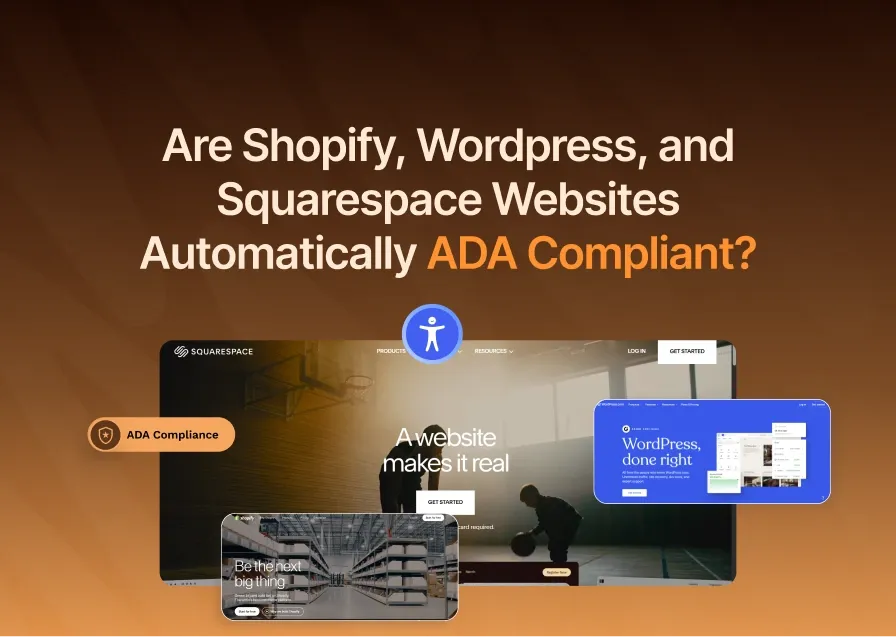
Does my Shopify / WordPress / Squarespace website automatically comply?
No. Your platform provides the infrastructure, but it does not make your specific site accessible. The theme you chose, the images you uploaded, the forms you built, the content you wrote — all of these require accessibility attention that platforms don’t handle for you. Data from 2025 shows that lawsuits routinely target Shopify, WordPress, Magento, and Squarespace sites.
Does having an accessibility overlay widget protect me from lawsuits?
No — and this is critically important. In 2024, 25% of all ADA website lawsuits targeted sites with overlay widgets already installed. The FTC fined accessiBe $1 million in January 2025 for deceptively claiming its widget provided guaranteed ADA compliance. Overlays cannot fix underlying HTML and code issues — they sit on top of them. Courts have found that overlay-only “compliance” does not constitute good-faith remediation.
What WCAG level do I need to comply with?
WCAG 2.1 Level AA is the standard referenced in most ADA lawsuits and by the Department of Justice. Level A is the minimum (and not considered sufficient), while Level AAA is aspirational. For legal protection, your target should be WCAG 2.1 AA. Some industries (federal contractors, healthcare, education) may also need to meet Section 508, which references WCAG 2.0 Level AA.
Can I be sued more than once for ADA website violations?
Yes. Settling one ADA lawsuit does not immunize you from future suits. If new violations appear, or if a different plaintiff targets you, you can be sued again. This is why ongoing monitoring and continuous compliance — not one-time fixes — is the only true protection.
Is there a tax credit for making my website accessible?
Yes. The IRS Disabled Access Credit (Form 8826) allows qualifying small businesses to claim up to $5,000 per year in tax credits for accessibility improvements. To qualify, your business must have had gross receipts of $1 million or less, or 30 or fewer full-time employees in the prior year. Speak with your accountant about applying this credit to your compliance costs.
What’s the most common violation that leads to ADA lawsuits?
Missing alt text on images is cited in 89% of ADA website complaints, making it the single most common violation. Other top issues include insufficient color contrast (79% of sites), missing form labels (48%), keyboard navigation failures, and empty or unlabeled links and buttons.
Do my PDFs need to be ADA compliant too?
Yes. If your website includes PDFs (menus, brochures, order forms, documents), those files must also be accessible. Screen readers can only read PDFs that have been tagged correctly with proper document structure, reading order, and alt text for images. Untagged PDFs are completely inaccessible to blind users.
Conclusion
ADA web compliance isn’t a problem reserved for big corporations with legal departments. Small businesses are the primary targets precisely because plaintiff firms know most will settle quickly rather than fight.
The good news: compliance is achievable, and the tools to get there have never been more accessible or affordable. The businesses that act now — before a demand letter arrives — do so on their own terms, at a fraction of the cost of reactive compliance.
Whether you’re a one-person Shopify store or a growing restaurant chain, the path forward is the same: scan your site, understand your gaps, fix the root issues, and monitor continuously. Everything else — the legal risk, the SEO drag, the lost customers — resolves itself when you get compliance right.
Start with a free scan here. It takes 60 seconds and shows you exactly where you stand.